Thứ Sáu, 6 tháng 1, 2012

Live Minutes Review, Free Web Conferencing Software

Looking for free web conferencing software, visit Live Minutes. They provide free web conferencing software. Yes, it is free and I am not sure how they're going to monetize their product. 


You can share and collaborate with others to discuss about any document, excel design sheet and design template. It is much more effective then by sending the files to your colleagues via email.
You could host a meeting without sign in, but your nice report would be public. Therefore, better you sign up and host a meeting. To sign up it is easy; just enter your username, email and password. That’s all. 


Then you could host a meeting. Just click the Host a Meeting button. And start inviting your friend to the meeting by sending web conference link to your friends.
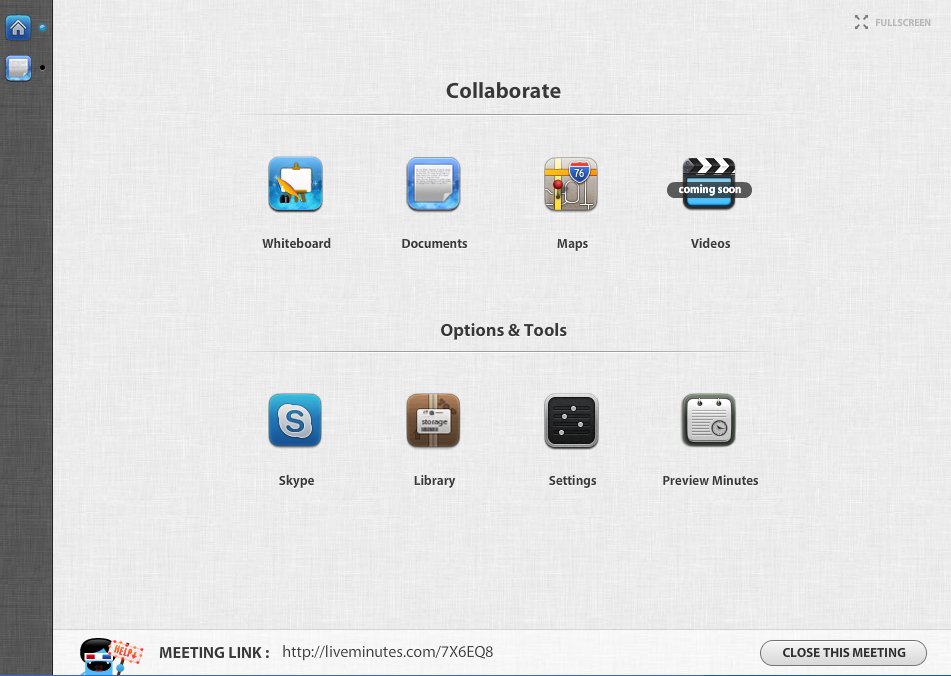
To have better audio and video system, use skype. Click skype icon, at the dashboard and you must also login into skype to enable skype mode for the web conference. Wait for other participants to call you, if you’re the host.
You could use Live Minutes whiteboard to convey hard to grasp ideas. Once the meeting is over, you could download a nice report that captures the participant inputs to the document. 


For more information, why not visit Live Minutes.
Live Minutes Review, Free Web Conferencing Software

Thứ Năm, 22 tháng 12, 2011

Tips To Reduce Eye Strains When Using Computer

Your eye is precious, one of the causes for eye problem such as eye floaters are caused by using computer for a prolong period without taking any break.

Learn to take frequently break when using computer, you don't need to constantly stare to the monitor screen . In addition, if you office have windows try to look at the out side view. This will help reduce your eye strain.

Other things that your could are by setting up your computer screen text and fonts bigger.

a) Make your web browser text and page content bigger.

You don't have to squint your eyes to 10 pixel text, make it bigger . For Google Chrome, to make the page content do this.


  • Click Spanar icon, located at the top right of the browser.
  • Click Option
  • Click Under The Hood
  • Go to the Web Content section, make Font Size larger and also the Page Zoom higher.

For Internet Explorer 8, the steps are as follows :


  • Click View
  • Set the Zoom and Text Size Bigger

b) In addition, you could as well make your Window icons and texts to be bigger. This is for Window Xp

The steps are as follows :


  • Go to your desktop. Right click your mouse.
  • Click Properties
  • Click Appearance Tab.
  • Set Font Size as Large Font or Extra Large Font
  • Now, it is better for your eyes.


c) For other computer programs, check whether they have functions to make the text and icons bigger.

For Adobe Dreamweaver, you could make the computer code to look bigger. The steps are as follows.


  • Open Dreamweaver.
  • Click Edit
  • Click Preference.
  • Click Font, for the proportional font, fixed font and code view, select bigger font size.

By just setting up your computer programs properly, you will be reduce your eye strains. 


Thứ Năm, 1 tháng 12, 2011

How To Add Captcha In Joomla Virtuemart Ask Question Page.


How To Add Captcha In Joomla Virtuemart Ask Question Page.


Adding captcha solves spam bots problem. If you want to add captcha to your Joomla Virtuemart ask question page. Just follow the following steps.


This instruction is for Joomla 1.5 and Virtuemart 1.1.4


Download osol captcha from the following link.  http://www.outsource-online.net/osol-captcha-for-joomla.html


Access your joomla admin using your usernama and password.


Install osol plugin, go to Extension > Install / Uninstall.


Choose the zip file and click Upload File & Intall.


Then go to plugin manager Entension > Plugin Manager , and enable the osol plugin.


Now you need access your cPanel, to edit your Virtuemart Product Ask Question.


I am using default theme, so the folder and file i need to edit are as follows


public_html/components/com_virtuemart/themes/default/templates/pages


Inside the pages folder, edit this file shop.ask.tpl.php .


You need to add osol code in the file, add the code before the submit button. Find this code. Add the following code before code mentioned above. That's all. Test and it should be ok.


You can copy the code from here >> http://probyte2u.hubpages.com/hub/How-To-Add-Captcha-In-Joomla-Virtuemart-Ask-Question-Page


How To Add Captcha In Joomla Virtuemart Ask Question Page.


Thứ Bảy, 19 tháng 11, 2011

How to Add Captcha in Php Form

Adding CAPTCHA to your form protects your site from spam bots. It is a program that generates colourful image with distorted text that human can read but current spam bots cannot figure out the text.


To add captcha to your php form, use reCaptcha. Your need to sign up to recaptcha using your google account. http://www.google.com/recaptcha


Go to my account and add your site. Once you have added your site, you will get the following details.


1) Public key


2) Private key


In addition, you need to get php recatpcha plugin from http://code.google.com/p/recaptcha/downloads/list?q=label:phplib-Latest


Once you have the Public key, Private key and recaptchalib.php file (Only this file is required for the recaptcha to work) from the plugin, you can start.


For details on the php programming side, please go to http://probyte2u.hubpages.com/hub/How-to-Add-Captcha-in-Php-Form


Thứ Năm, 10 tháng 11, 2011

Database Security Tips

When developing website or ecommerce solution, important aspect of the design is the database security. The database needs to be protected from any security loopholes. If you’re using MySQL, one way to protect your db is by using MySQL access privileges system. You create specific user type for different user activity.

For example, if you developing website where user can register and add content inside your website. You might have three type of users:

Public : general user who might just select and browse through your site.
Registered : User who can add content to your site.
Admin : User who manage your users and content. Ban the users and some other admin function.

Based on the user types , you create separate MySQL user accounts with the following permission.
Public : SELECT
Customer : SELECT, INSERT, UPDATE
Admin : SELECT, INSERT, UPDATE, DELETE

You could write your configuration file as follow:

DEFINE(‘DB_HOST’,’localhost’);
DEFINE(‘DB_NAME’,’databasename’);

If (isset($user) && ($user==’Admin’)) {
DEFINE(‘DB_USERNAME’,’usernameA’);
DEFINE(‘DB_PASSWORD’,’passwordA’);
} 

elseif (isset($user) && ($user==’Customer’)) {
DEFINE(‘DB_USERNAME’,’usernameB’);
DEFINE(‘DB_PASSWORD’,’passwordB’);
}

else {
DEFINE(‘DB_USERNAME’,’usernameC’);
DEFINE(‘DB_PASSWORD’,’passwordC’);
}

Keep the connection file outside of your web root, in a private folder. This prevents outsider’s access to site. If you don’t have a private folder, then protect the file by using .htaccess

Try not to provide the following permissions to users who connect from website. If you got hacked, you will give lots of fire power to the hacker to do the damage.

PROCESS, FILE, SHUTDOWN, DROP, CREATE and ALTER.

By limiting the users’ permission you can protect your site from any harm. Even if you site has been hacked, the damage could be limited.

Credit: Effortless E-Commerce with Php and MySQL, Larry Ullman.

Thứ Hai, 25 tháng 7, 2011

Nuffnang Reports It's Site Has Been Hacked

The email is below. 

Dear Nuffnanger,

Hope this email finds you well! We'd like to ask if you could please spend a few minutes of your time on this very important community announcement.

Yesterday evening on Friday (22nd July), we discovered an illegal and unauthorised intrusion into our network, which was the latest in a series of hacking incidents by a group of individuals who also claim to have targeted Streamyx, CIMB, TV3 and the several other local websites previously. In our case, the hackers claimed to have downloaded a portion of our blogger account information and published the emails of some 30,000 Nuffnang accounts.

The breach has since been fixed, and we’d like to address a few key concerns that you may have.

1. Your password is safe.
As part of the existing security measures, all user passwords in our database have always been protected with one-way encryption. Nevertheless, we still encourage you to change your password (especially if you use the same password for other sites) as a precautionary measure in case the hackers are able to get past the encryption.

2. Blog earnings and payment records are not affected.
Current earnings and payment history for all users are safe and were not compromised in any way.

3. Loading of blogs serving Nuffnang ads is not affected.
At 1.00 am last night, our Tech team took down the website for maintenance and for a few hours, ads were not served. This morning though, everything is up and running again and back to normal. All blogs serving Nuffnang ads loaded as usual and were not affected by the breach.

This security lapse is an isolated incident, as the security of our sites has always been and always will be our utmost priority. It has however opened our eyes on some vulnerabilities we had on our website. In response to that, we will be taking measures to further heighten the security of the Nuffnang framework because from what we understand, that was after all the motivation of the hackers – not to cause any permanent damage, but to highlight vulnerabilities in a system.

To the Nuffnangers who made many attempts to alert us once word got out that the Nuffnang site was hacked, we cannot begin to thank you enough.

To the wonderful Nuffnang community, thank you for standing by us in this time of crisis. Your patience and support is something we are thankful for and will never take for granted. We apologize for any inconvenience caused, and for not being able to prevent this breach. We have put dedicated staff to work on this matter, therefore to address any concerns or questions you may have about this incident, please write in to us at security [at ] nuffnang [dot ] com

Thank you.

Sincerely,
The Nuffnang Team