Hiển thị các bài đăng có nhãn Google. Hiển thị tất cả bài đăng

Thứ Sáu, 1 tháng 4, 2011

Introducing Gmail Motion Beta


Once again Gmail has shown why they are the best free web based email service provider. Now they have come up with Gmail Motion that enables you to compose your emails by detecting your body motion.
You need to have webcam for this to work.
By using Gmail patented technology it can detect your body motion and perform the necessary commands to send your email. List of command that the new system can detect from your body motions are as follows.
  1. Compose email
  2. Reply
  3. Reply All
  4. Forward
  5. Send Search
  6. Archive
  7. Star Message
  8. Report Spam
  9. Mark as unread
  10. Mute conversation
Good job Gmail !
Introducing Gmail Motion Beta

Thứ Ba, 1 tháng 3, 2011

How to upgrade Google Chrome

For the latest security updates,Google Chrome automatically updates when it detect new version.
Updates is available if the wrench icon has little arrow at it.
To upgrade, the steps are as follows.
  1. Click the wrench icon
  2. Click Upgrade Google Chrome.
  3. Once done with the upgrade it will ask you whether to complete the process by clicking Ok or Not Now
  4. Click Ok and it will complete the upgrade process and restart your browser.
  5. If Not now, the upgrade process will take effect next time you open Google Chrome.
Another way to check for new updates are follows.
  1. Open Google Chrome, then click the wrench icon at the top left of Google Chrome browser.
  2. Then Click About Google Chrome
  3. System will check for updates and it will upgrade your browser automatically.
  4. Click Ok, to complete the process. It will restart back and the upgrade process is completed.

Thứ Bảy, 13 tháng 11, 2010

Google Voice Review

I have been using Google voice for few weeks now and find out that it is something that you could use to save cost to make international calls.
The rates are much more competitive compared to traditional telephone network provider.
To make calls to any fixed or mobile number, you need to add credit of 10 / 25 / 50 USD. Once you have added credit , you could call from Gmail orGoogle Voice.
In Gmail, it is located below the label section. There is a Call Phone link, click the link then the phone box will pop up at the bottom-right hand side of the screen. Enter the number and just click Call to make you call.
Called to India and Bangladesh using it. The rate to India is only 0.06 USD per minute, whereas Maxis rate is 0.16 USD / minute. For Bangladesh, the rate is only 0.10 USD compared to Maxis the rate is 0.17 USD / minute. For other countries also, if I compare the rates between Google Voice and Maxis (cell phone line), Google Voice rate is much more cheaper.
Normally, I will use it for initial call for my cold callings, since the quality of call still depends on my broadband connectivity. If the quality is good, then could reduce my sales call cost. However, if it's poor that I have to rely on my cell phone line.
How about SkypeSkype rate to India is 0.106 USD/ minute and to Bangladesh is 0.159 USD/minute.
So, for now will I hang on with Google Voice. Hopefully their phone call quality will improve in the future.

Thứ Tư, 14 tháng 4, 2010

Google Translate For Website and Joomla 1.5


Now you could develop website with multiple languages with ease. Just add in Google Translator in your website. With more languages option, your website will reach more audience. Plus, you don't have hire a translator to do it.


To add in google translator for your website, just go to Google Translate.


Then change the settings for the gadget, adjust the height and weight and if you want, you could change the title as well. Modify the corners according to your site design.


Google Translate for Website


Then click Get Code to add in the gadget, copy and paste the code in your website page. 


Google Translate for Website


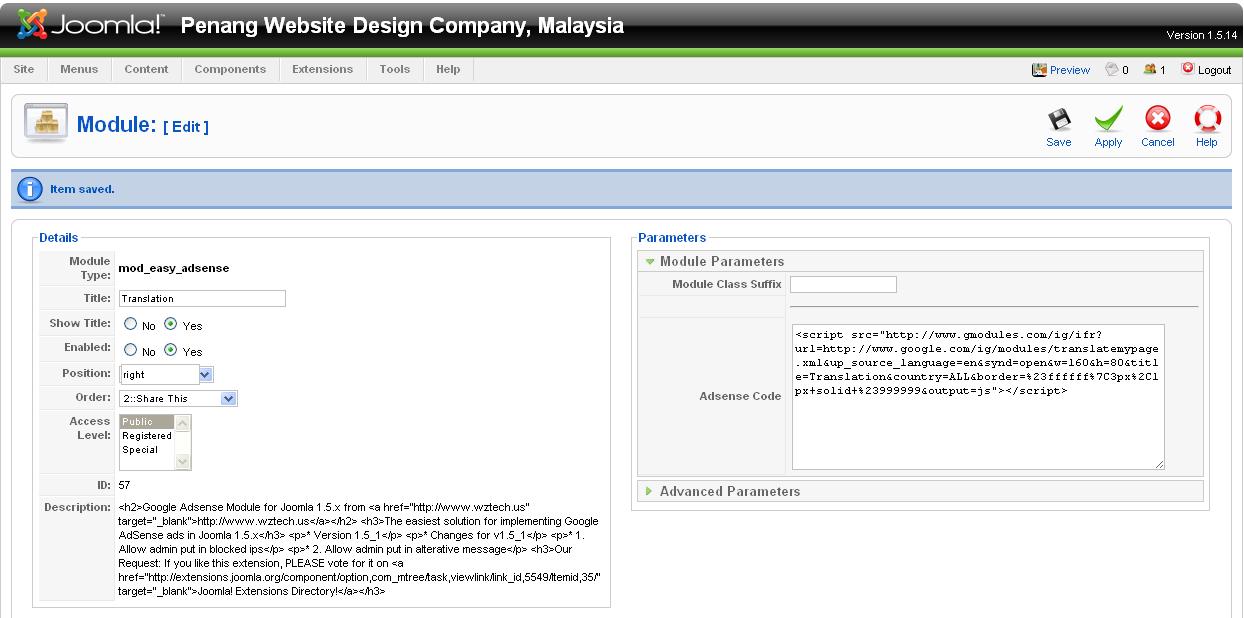
If you want to add in joomla, then you could add in the gadget by installing easy adsense module, to get the module go to Easy Adsense


I tried with one joomla module with Google Translator, but it gave me some errors while using Google Chrome.


Install the module as usual and the paste the code in adsense code field. Enable the module and position the module at the location you want and save.


To view Google Translator in action, please visit Penang Website Design. Good luck!


Google Translate for Website


Thứ Bảy, 4 tháng 7, 2009

Zemanta - Smart tool to improve your blogging experience

Blog better using ZemantaImage by chucks via Flickr


If you are looking for a tool that will spice up your blogging experience then you should use Zemanta.

Click Here, to add in to your Mozilla Browser.

Once, you have uploaded Zemanta. You focus on writing your article and Zemanta will spice up your blogging experience by providing you simple point & click enrichment of your blog posts.

In real-time, while you type. Zemanta will suggest tags, links, photos, related articles, and more.

Zemanta image on top was suggested by Zemanta itself.

To find out how Zemanta works, please refer to the video below :


Zemanta, supports following blogging platform


Affiliate Blogging Made Easy

  • Automatic integration with Amazon affiliate system
  • Link to Books, DVD's and CD's Single click
  • Amazon covers for richer posts with higher click-through ratio

Relevant content

Over 20 different sources of content for your blog
  • Trusted reference databases
  • Biggest sources of entertaiment
  • and everything else that you're passionate about!

All the related articles below was suggested by Zemanta, I only need to click to post it below. Truly makes your blogging experience very nice.


It's really a cool gadget, test it and I am sure that you will love.


Reblog this post [with Zemanta]